Category: Product Education
Tags: Ray3, HDR video, Draft Mode, physics simulation, model comparison, Ray2, Ray1.6, advanced features
Introduction
Ray3 is the newest and most advanced model in Dream Machine's evolution of AI video generation. It represents a revolutionary leap forward with cinema-quality videos, realistic physics simulation, and native HDR support that rivals traditional filmmaking.
Ray3 is the first model to offer native HDR video generation, advanced physics like realistic water flow and character movement, plus Draft Mode for cost-effective testing and iteration. This article introduces Ray3's capabilities and shows how it compares to previous generations.
Evolution of AI Video Generation
Dream Machine's models have evolved significantly over time, with each generation bringing substantial improvements:
Ray1.6 established foundational video creation capabilities, allowing users to generate AI video content with basic motion and scene understanding.
Ray2 (announced December 2024, released January 2025) brought 10x more computational power with enhanced motion coherence and refined playback experience. Ray2 introduced improved camera control and more reliable prompt adherence.
Ray3 takes this evolution to revolutionary heights with cinema-quality videos, realistic physics, and native HDR support. Ray3 represents the pinnacle of current AI video generation technology, offering unprecedented control and realism.
Key Ray3 Features
Native HDR Video Generation
Ray3 is the first Dream Machine model to offer native HDR (High Dynamic Range) video generation. This provides richer colors, deeper blacks, brighter highlights, and more realistic lighting that rivals traditional filmmaking quality.
Advanced Physics Simulation
Ray3 includes sophisticated physics understanding for realistic simulations including:
Water flow and fluid dynamics
Character movement and weight distribution
Bubble physics with light refraction patterns
Surface tension and natural material behavior
Steam, smoke, and atmospheric effects
Draft Mode for Cost-Effective Testing
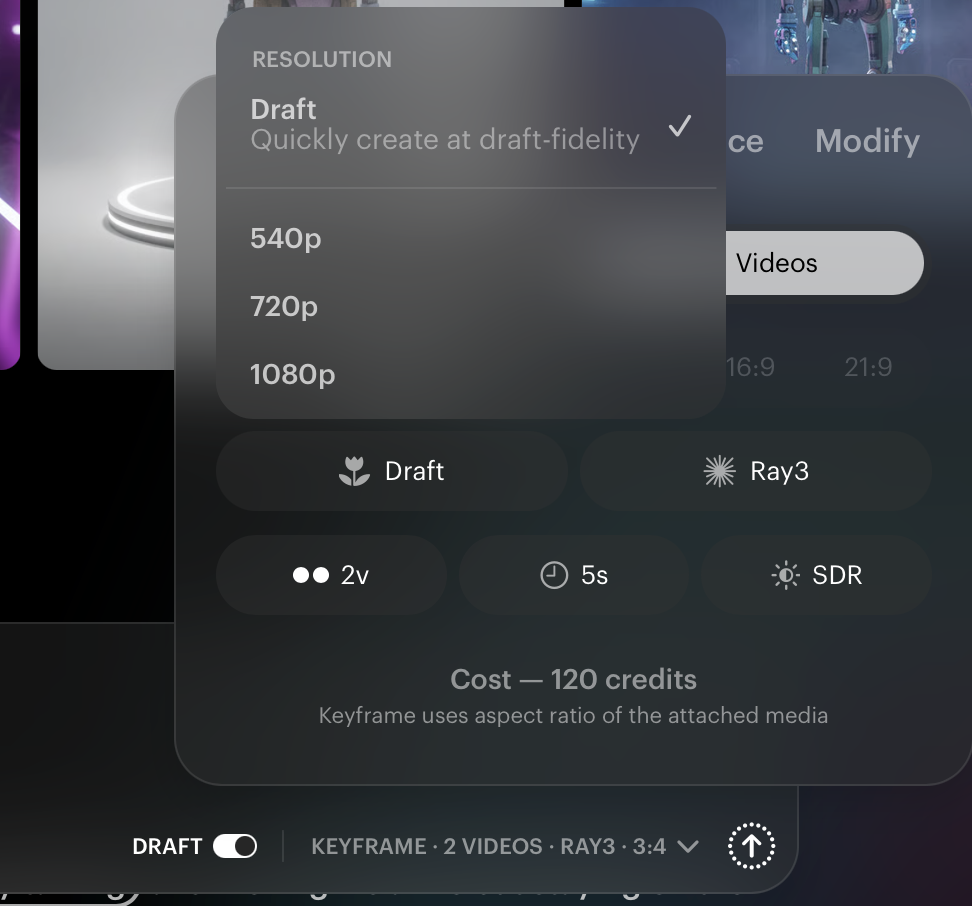
Ray3's Draft Mode allows you to test the model's advanced capabilities with reduced credit costs and faster generation speeds. Ray3's physics engine and reasoning capabilities work fully in Draft Mode, letting you perfect prompts before upgrading to Hi-Fi quality for final output.
Hands-On Comparison Example
To understand Ray3's improvements, compare how the same prompt performs across different models:
Prompt: "Golden morning, close up of a cat's eyes, blinks slowly"
View the progression from Ray1.6 through Ray2 to Ray3 to see the dramatic quality improvements in detail, motion, and realism.
RAY1.6 (Deprecated/Discontinued Dec 31,2025)
RAY2
RAY3
Test Prompts to Experience Ray3
Try these advanced prompts to experience Ray3's capabilities:
Test Prompt 1:
"Cinematic macro close-up shot, slow push-in movement toward subject. Crystal wine glass filled with sparkling champagne creating realistic bubble physics with light refraction patterns, positioned on polished mahogany table with ambient candlelight reflections, tiny bubbles rising in helical spirals as liquid surface tension creates natural meniscus curves, camera continuing forward to capture prismatic light dispersion through crystal facets."
Settings: Ray3, 720p, HDR ON, 16:9
Test Prompt 2:
"Steam from nearby dinner plate drifts across frame as candlelight flickers creating dynamic shadow play on table surface. Luxury dining genre, warm ambient lighting with golden candlelight and crystal refractions creating sparkle highlights. Photorealistic HDR fidelity, elegant fine dining aesthetic, romantic intimate mood, extreme macro detail transitioning to atmospheric dining room ambiance."
Settings: Ray3, 720p, HDR ON, 16:9
These prompts showcase Ray3's advanced physics simulation, HDR capabilities, and ability to handle complex lighting scenarios with realistic material interactions.
Important Compatibility Note
Note that Modify Video currently only works with Ray2 and Ray2 Flash. If you need to use the Modify Video feature, you'll need to work with Ray2-based models. Ray3 focuses on advanced generation capabilities with its native features.
PRO TIP: Draft Mode Strategy
Use Draft Mode to test Ray3's advanced capabilities with reduced credit costs and faster generation speeds. Ray3's physics engine and reasoning capabilities work in Draft Mode, letting you perfect prompts before upgrading to Hi-Fi quality. This workflow saves credits while allowing extensive experimentation to achieve your desired result.
Troubleshooting
What happens if my Ray3 generations don't show the advanced physics I expected?: Ensure you're explicitly describing physical interactions in your prompt. Ray3 understands physics, but you need to guide it with details like "realistic bubble physics," "water flowing naturally," or "fabric draping with weight." The more specific your physics descriptions, the better Ray3's simulation.
Why doesn't HDR seem to be working in my Ray3 videos?: Verify that HDR is turned ON in your settings before generation. HDR is not automatic—it must be explicitly enabled. Also ensure your prompt includes lighting scenarios that benefit from HDR, such as scenes with bright highlights and deep shadows, candlelight, sunsets, or high-contrast environments.
My Ray3 Draft Mode results look different from what I expect in Hi-Fi...: Draft Mode prioritizes speed and cost efficiency while maintaining Ray3's core capabilities. For final delivery, always generate in Hi-Fi mode. Use Draft Mode for testing compositions, camera movements, and prompt refinement, then switch to Hi-Fi for your final output with maximum quality.
Can I use my Ray2 or Ray1.6 prompts directly in Ray3?: Yes, but Ray3 understands more sophisticated and detailed prompts. Ray3 benefits from specific physics descriptions, material properties, lighting details, and camera movement instructions that simpler models might ignore. Consider enhancing your prompts to take advantage of Ray3's advanced understanding.
Why can't I use Modify Video with Ray3?: Modify Video currently only supports Ray2 and Ray2 Flash. This is a compatibility limitation. If you need Modify Video functionality, generate your base video with Ray2, use Modify Video for changes, then consider regenerating similar scenes with Ray3 for final quality if needed.
Frequently Asked Questions (FAQs)
1. What makes Ray3 different from Ray2 and Ray1.6? Ray3 offers native HDR video generation, advanced physics simulation (water flow, character movement, realistic material behavior), and improved prompt understanding. It produces cinema-quality videos with lighting and realism that rivals traditional filmmaking, representing a revolutionary leap beyond Ray2's 10x computational improvement over Ray1.6.
2. Should I always use Ray3 for my projects? Ray3 is the most advanced model and ideal for final deliverables requiring maximum quality, HDR support, or realistic physics. However, if you need Modify Video functionality, you'll need to use Ray2 or Ray2 Flash. Use Ray3 Draft Mode for testing before committing to Hi-Fi generations.
3. Does Draft Mode in Ray3 sacrifice quality or features? Draft Mode generates faster and uses fewer credits while maintaining Ray3's physics engine and reasoning capabilities. It's perfect for testing and iteration. Quality is reduced compared to Hi-Fi, but all advanced features work. Always use Hi-Fi for final deliverables.
4. What is HDR and when should I enable it? HDR (High Dynamic Range) provides richer colors, deeper blacks, brighter highlights, and more realistic lighting. Enable HDR for scenes with high contrast, candlelight, sunsets, dramatic lighting, or any scenario where lighting realism matters. HDR must be explicitly turned ON in settings—it's not automatic.
5. Can Ray3 understand complex physics without me describing them in prompts?Ray3 has sophisticated physics understanding, but explicit guidance produces the best results. Describe the specific physics you want: "realistic bubble physics with light refraction," "water flowing with natural surface tension," or "fabric draping with realistic weight." Detailed physics descriptions help Ray3 simulate exactly what you envision.
Related Articles
Original Author: Chris Roebuck, Luma AI – Customer Support - Education
Original Creation Date: Thu, 18 Sep 2025 at 8:21 PM
Updated by: KB Conversion Team
Was this article helpful?
That’s Great!
Thank you for your feedback
Sorry! We couldn't be helpful
Thank you for your feedback
Feedback sent
We appreciate your effort and will try to fix the article